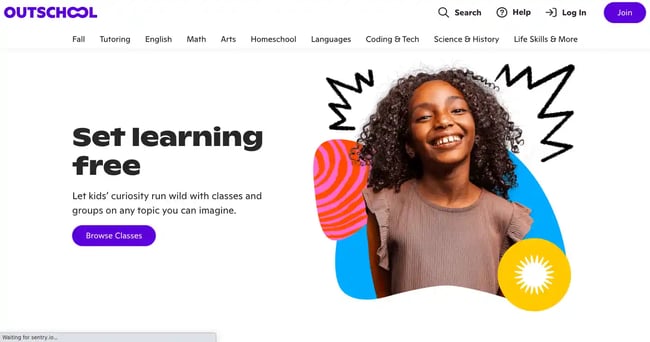
To build a professional tutoring website that converts, focus on creating a clear, user-friendly, and credible online presence that addresses your target audience’s needs and encourages them to take action.
Key steps and elements include:
-
Define Your Website Goals
Decide what you want your website to achieve—attract new students, showcase qualifications, enable online booking/payments, or all of these. This shapes your design and functionality. -
Choose the Right Platform and Template
Use a website builder or CMS that offers responsive, SEO-friendly, and customizable templates suited for tutoring services. Pick a clean, professional design that matches your brand and is easy to navigate on all devices. -
Design a Clear and Compelling Homepage
Your homepage should immediately communicate what you tutor (subjects, grade levels) and address common concerns of parents or students (e.g., “Helping middle school students excel in math”). Use strong calls-to-action (CTAs) like “Book a Session” or “Contact Us” to guide visitors toward conversion. -
Include Essential Pages
- About Us: Share your background, mission, and qualifications to build trust.
- Services: Clearly list tutoring subjects, formats (online/in-person), and pricing.
- Testimonials: Display reviews or success stories to enhance credibility.
- Contact: Provide multiple contact options and social media links for easy communication.
-
Optimize for User Experience and SEO
- Keep navigation simple and intuitive with clear menus.
- Use readable fonts, light backgrounds, and high-quality images of tutoring sessions or happy students.
- Ensure mobile responsiveness and fast loading times.
- Implement SEO best practices like keyword-rich content, alt text for images, and blog posts answering common questions (e.g., “How to Prepare for SAT Math”).
-
Build Trust and Credibility
Use authentic visuals, consistent branding (logo, colors, fonts), and professional language. Avoid clutter and poor design choices that can deter visitors. -
Add Functional Features
Consider online booking systems, payment integration, and automated scheduling tools to streamline client acquisition and management.
By combining these elements, your tutoring website will not only look professional but also effectively convert visitors into paying students or clients.